Overview
Roles control what each user can see and do within your Beeswax account. When you invite someone to your account, you assign them a role that determines their level of access across projects, finances, and account settings.
There are seven roles in Beeswax. Six of them — Basic, Basic Plus, Manager, Super Admin, Accountant, and Client — can be assigned when you invite a user. The seventh, Owner, belongs to the person who created the account and cannot be assigned through an invitation.
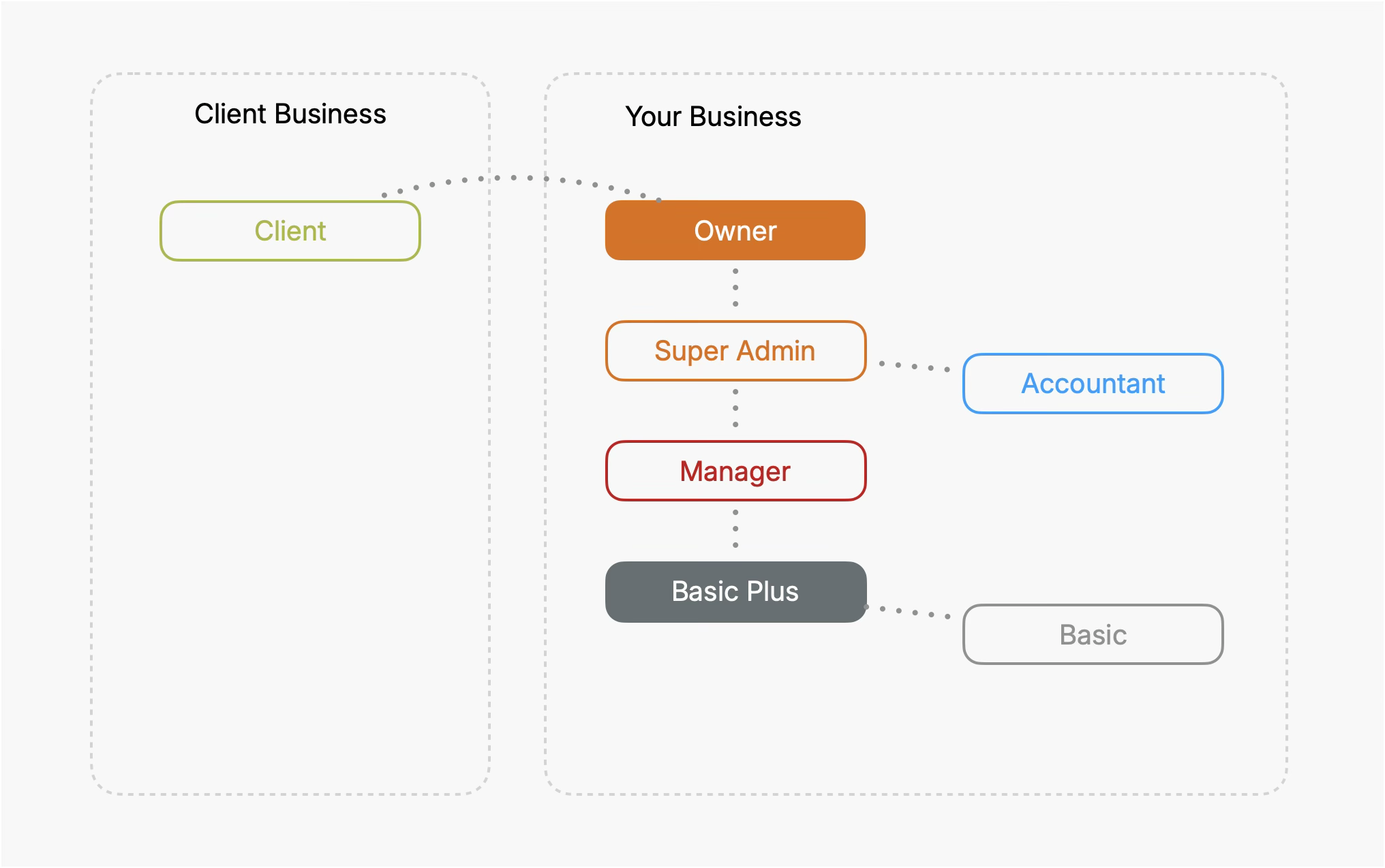
| Role | Best For |
|---|---|
| Owner | The account holder, with full access including billing |
| Super Admin | Overseeing the entire business with full access |
| Accountant | Full access to accounting and financial features |
| Manager | Day-to-day management of projects and operations |
| Basic | Team members focused on getting tasks done |
| Basic Plus | Team members who need to see and manage everyone's tasks |
| Client | External clients viewing their own quotes and invoices |
Owner
Owner
The Owner is the person who created the account and holds the highest level of access. Owners have full, unrestricted access to every feature — including billing and subscription management, which no other role can reach. There is one Owner per account, and the Owner role cannot be assigned through an invitation.
| Feature | View | Create | Edit | Delete |
|---|---|---|---|---|
| Projects | ||||
| Tasks | ||||
| Milestones | ||||
| Time Entries | ||||
| Products & Services | ||||
| Businesses | ||||
| People | ||||
| Money | ||||
| Accounting | ||||
| Connected Apps | ||||
| Account Settings | ||||
| Subscription |
Owner-only capabilities:
- Subscription & Billing: The Owner is the only role that can view and manage the account's subscription and billing — not even a Super Admin or Accountant can access this.
- Account Management: Owners can edit the account name and delete the account entirely.
- API Tokens: Owners can create and manage API tokens.
- User Roles: Owners can invite users and assign any role, and can change other users' roles — but cannot change their own role.
Super Admin
Super Admin
Super Admins have full access to everything in the account, except subscription management. This role is for users who need to oversee the entire business.
| Feature | View | Create | Edit | Delete |
|---|---|---|---|---|
| Projects | ||||
| Tasks | ||||
| Milestones | ||||
| Time Entries | ||||
| Products & Services | ||||
| Businesses | ||||
| People | ||||
| Money | ||||
| Accounting | ||||
| Connected Apps | ||||
| Account Settings | ||||
| Subscription |
Additional Super Admin capabilities:
- Leave Management: Super Admins can add leave directly (not just request it) and can edit or delete approved leave entries.
- Time in Lieu: Super Admins can add Time in Lieu entries directly and manage existing entries.
- Transaction Account & Tax fields: Super Admins can change the Transaction Account and Tax fields on invoices and expenses, even after they have been finalised.
- Contact Company Assignment: Super Admins can change which company a contact is associated with when editing.
- Invoice/Quote Notes Position: Super Admins can configure whether notes appear at the top or bottom of invoices and quotes.
- API Tokens: Super Admins can create and manage API tokens.
- Payroll & Employment: Super Admins can view and manage employee payroll settings, employment details, and payslips.
- User Deactivation: Super Admins can deactivate and reactivate user accounts.
Accountant
Accountant
Accountants have full access to all features except subscription management. This role is designed for accountants and bookkeepers who need complete access to financial and operational data.
| Feature | View | Create | Edit | Delete |
|---|---|---|---|---|
| Projects | ||||
| Tasks | ||||
| Milestones | ||||
| Time Entries | ||||
| Products & Services | ||||
| Businesses | ||||
| People | ||||
| Money | ||||
| Accounting | ||||
| Connected Apps | ||||
| Account Settings | ||||
| Subscription |
Important details for Accountants:
- User Invitations: Accountants cannot send user invitations, even though they have full access to manage people records.
- API Tokens: Accountants cannot create or manage API tokens.
- Payment Approval: Accountants cannot approve payments.
- Transaction Account & Tax fields: Accountants can change the Transaction Account and Tax fields on invoices and expenses, even after they have been finalised.
- Account Management: Accountants have no access to Account Settings — they cannot view, edit, or delete the account configuration.
Manager
Manager
Managers handle the day-to-day management of projects. They have full access to projects, tasks, milestones, time entries, businesses, people, and money. They can view products & services but cannot create, edit, or delete them. They cannot access accounting, connected apps, account settings, or subscription management.
| Feature | View | Create | Edit | Delete |
|---|---|---|---|---|
| Projects | ||||
| Tasks | ||||
| Milestones | ||||
| Time Entries | ||||
| Products & Services | ||||
| Businesses | ||||
| People | ||||
| Money | ||||
| Accounting | ||||
| Connected Apps | ||||
| Account Settings | ||||
| Subscription |
Important restrictions for Managers:
- Transaction Account & Tax fields: Managers can set and change the Transaction Account and Tax fields on Quotes, Expenses, and Invoices while a document is still editable — that is, before it has been paid (or, for a quote, before it has been accepted). Once a document is finalised, these fields lock for Managers; after that, only a Super Admin or Accountant can change them.
- Recurring Invoices: Managers cannot create or manage recurring invoices.
- Bank Transfers & Reconciliation: Managers cannot create bank transfers or perform bank reconciliation.
- Statements: Managers cannot access bank statements.
- Payment Approval: Managers cannot approve payments.
- Transaction Templates: Managers can view transaction templates but cannot create, edit, or delete them.
- Leave Management: Managers can request leave but cannot add leave directly. They cannot edit or delete approved leave entries.
- Time in Lieu: Managers can request Time in Lieu but cannot add entries directly, and cannot edit or delete existing entries.
- API Tokens: Managers cannot access or manage API tokens.
Basic
Basic
A Basic user is focused on getting tasks done. They have limited access and can only view projects, tasks, milestones, and time entries. They cannot access financial, accounting, or admin features.
| Feature | View | Create | Edit | Delete |
|---|---|---|---|---|
| Projects | ||||
| Tasks | ||||
| Milestones | ||||
| Time Entries | ||||
| Products & Services | ||||
| Businesses | ||||
| People | ||||
| Money | ||||
| Accounting | ||||
| Connected Apps | ||||
| Account Settings | ||||
| Subscription |
Note: Basic users can create Tasks, Milestones, and Time Entries (newly created items are assigned to them by default). They can also edit and delete these items, but only the ones assigned to them — the Edit and Delete restrictions above apply to items owned by other users.
Additional details:
- Leave Management: Basic users can request leave, and can edit or delete their own leave only while it is unapproved. Once leave is approved, it cannot be modified.
- Time in Lieu: Basic users can request Time in Lieu but cannot edit or delete entries.
- API Tokens: Basic users cannot access or manage API tokens.
Basic Plus
Basic Plus
A Basic Plus user has everything a Basic user has, plus account-wide task visibility. They can see every project (read-only) and view, create, edit, and delete all tasks in the account — not just the ones assigned to them. Everything else (milestones, time entries, and the lack of money, people, and admin access) is exactly the same as a Basic user.
| Feature | View | Create | Edit | Delete |
|---|---|---|---|---|
| Projects | ||||
| Tasks | ||||
| Milestones | ||||
| Time Entries | ||||
| Products & Services | ||||
| Businesses | ||||
| People | ||||
| Money | ||||
| Accounting | ||||
| Connected Apps | ||||
| Account Settings | ||||
| Subscription |
How Basic Plus differs from Basic:
- Tasks: Basic Plus can view, create, edit, and delete every task in the account — across all projects, regardless of who the task is assigned to. (A Basic user is limited to tasks assigned to them.)
- Projects: Basic Plus can view all projects (read-only), so the full task board is visible. They still cannot create, edit, or delete projects.
Everything else matches Basic:
- Milestones & Time Entries: Can create their own, and edit or delete only the ones assigned to them.
- Leave & Time in Lieu: Can request leave (editable while unapproved) and request Time in Lieu (cannot edit or delete entries).
- Money, Accounting, People, Businesses & Settings: No access.
- API Tokens: Cannot access or manage API tokens.
Client
Client
The Client role provides access to a dedicated client portal. Clients do not have access to your projects, tasks, accounting, or internal operations.
When a client is invited and accepts the invitation, they get access to:
- Quotes that have been sent to them and are awaiting approval
- Invoices that have been sent and are outstanding
- Milestones and Events marked as visible to clients
That's it. There is no way to accidentally assign them to a Task or give them access to any of your Projects or Accounts.
Important: Company Association
When inviting someone as a Client, you must select a client company for them. The client user will only see quotes, invoices, milestones, and events associated with that specific company. The selected company must be marked as a client and cannot be the account owner's company.
Who Can Invite Users
Not all roles can send invitations or assign every role type.
| Action | Owner | Super Admin | Manager | Accountant | Basic | Client |
|---|---|---|---|---|---|---|
| Send invitations | ||||||
| Assign Basic role | ||||||
| Assign Basic Plus role | ||||||
| Assign Manager role | ||||||
| Assign Super Admin role | ||||||
| Assign Accountant role | ||||||
| Assign Client role |
Tips
- Assign the minimum role necessary. Use the Basic role for team members who only need to work on their assigned tasks.
- Use the Client role for external contacts. Clients only see their own quotes, invoices, and milestones — nothing else.
- Reserve Super Admin for trusted users. Super Admins can access and modify nearly everything in the account.
- Accountants get full financial access. If you work with an external accountant or bookkeeper, this role gives them everything they need without access to billing.
- Only the Owner can manage the subscription. No other role, including Super Admin, can view or modify subscription settings.